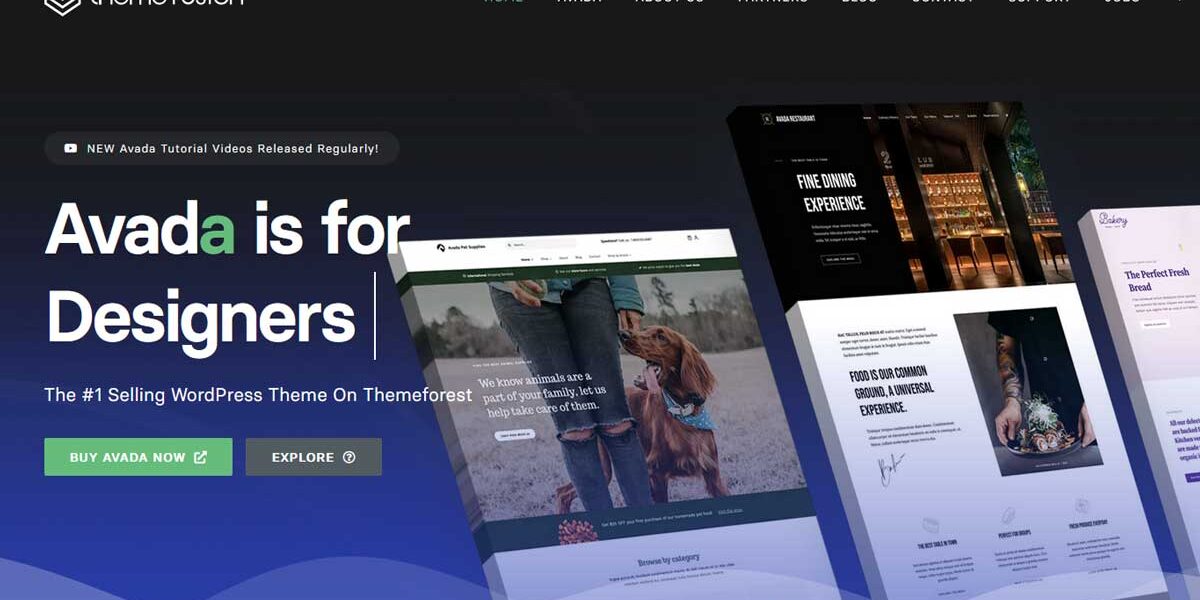
Avada Theme: An Introduction
Avada is a multipurpose WordPress theme that can be used to create WordPress websites of any niche. It comes with multiple demo options to let you choose the niche.
The Avada WordPress theme is a full package of design and premium features to create a modern and efficient website. Moreover, it is very easy to use.
To use Avada to set up your new website, you won’t need to hire experts or learn coding skills. All you need to do is install the theme and start creating your website.
Avada comes with a partner plugin called the “Fusion Builder”. This plugin just makes Avada, one of the most powerful & popular WordPress themes. It comes with powerful modules like portfolio management, shortcodes, etc.
Avada is a multipurpose theme!
Often called the swiss army knife, it can be used for any kind of website, one-page website, a law business site or a corporate business website, a blog site or an online eCommerce enterprise, an IT website, a hosting company site, or a wedding website.
The base of the Avada theme is the Fusion builder, which makes Avada as good as any other website builder available on the internet. The Fusion builder is what allows you to redesign or design elements, and provides you with the best customer support, and design a brilliant online presence on your own.
Avada Demos
And fortunately, this theme comes with a specially designed fast demo version for each of the niches mentioned above, plus many many more. The demos are professionally designed for different industries like healthcare, Cafe, Agency, Travel, Photography, etc. Avada is one of the WordPress themes with different demo versions, which makes it truly multi-purpose.

Currently, there are over 45 pre-designed demos, with one-click installs, including the Avada Classic, Avada Law, Avada Sports, Avada University, Avada Creative, a 5-star hotel, etc.
Each of the demos comes with a different arrangement of page elements & widgets, colors, and other suitable settings. These demos are great for you to kickstart your new website without having to spend a lot of time planning and restructuring your multipurpose theme.
And what more, even the demo import in the Avada is fast & flexible. You can either import the full demo, or a partial demo for your site. Also, if you want to totally remove the design, you can even uninstall the demo with a single click.
For those who want to use the Avada with external plugins like WooCommerce or bbPress, the Avada demo options also include products import, bbPress content imports, Events Calendar content imports, etc.
All these demos and pre-built templates are simply there to make your life easier and website building faster. Just install the theme, import the demo and start adding your content to your site.
Avada theme demos
Customization options in Avada Theme
Avada is one of the most popular multipurpose themes, and it is because of its flexibility, the front end editing options, and customizability to let you build websites of different designs and niche using it.

Well, This WordPress template has it all. With all the available customization options, you can make endless changes to your site’s interface and make it look and work exactly the way you want.
Moreover, all these changes can be made without touching a line of code. The guidance on how to use the options is available in the documentation. However, most of them are self-explanatory.
Ultimately, using the combination of the theme options and fusion builder, it is possible to change the theme into exactly what you want.
Choose from the built-in page templates and edit them as you go
First of all, you can choose from the available page templates to choose as a base design for your page. Or if you have imported a demo website, you can totally edit the existing design.
The page templates can be used directly or customized as per your requirements. Avada allows you to customize all your pages/posts through global theme options or individual page settings.
If you want to create portfolios on your site, you are allowed to choose the template with up to 6 columns. The Advanced page/post options make it very easy to control how each page of your site looks!
Unlimited customizability through the dashboard options
The search option available in your dashboard makes it easy for you to find the option you are looking for. These options will let you manage both: the design as well as functions.
All these options help you design your own website without actually understanding/modifying the code. There is also a search feature, that you can use to find the relevant option on your dashboard. It saves time and makes editing more convenient at the admin’s end.
Never created a website before? Then the Avada, a flexible as well as popular WordPress template is for you.
To use it, you need no technical skills or professional help. All the dashboard options are intuitive and help you use the custom features and manage the content of your website.
Page builder by Fusion builder

This is definitely the age of easy and convenient page building. Avada comes with this modern age drag and drop page builder called the Fusion builder to manage different web elements. This page builder includes different components like the header builder/footer builder, to create meaningful page & post designs without any designing skills.
The front-end editing interface provides you with intuitive page building options so that you can design your own pages. It also includes a shortcode generator to make editing and content building easier with the inbuilt page builder. Both, content editing, as well as content building, becomes easier using different page building elements.
You can design creative layouts by simple options or by using shortcodes. Some of the design elements of the Fusion page builder even allow preview.
With the Fusion page, you can create pages and customize them easily, without even accessing theme options. Similar page builder-like options are available with the header builder and footer builder module so that you can easily create attractive pages, without writing a line of code.
With the front-end editor, it is possible for you to make visual changes as and when needed, without much hassle. Avada works as a website builder, with endless possibilities to create professional-looking websites, without actually learning the professional web building skills, or hiring the programmers to build one for you.
Unlimited design possibilities
There’s no limit when it comes to the flexibility of your Avada WordPress theme. You have multiple header options, slider settings, fonts, colors, icons, etc. to customize your pages. So it is easy to build custom page designs with Avada.
Besides you can add to the usability and relevance of the page by adding custom widgets, sidebars, and custom CSS3 animation effects on-page elements. Also, you can use the site width options, mega menus, custom backgrounds, etc.
Avada: Documentation & Support
If you are a beginner trying to create your website with WordPress, Avada multipurpose theme is ideal. You can choose a design from the available templates, or start to design a page from scratch using the methods, and explanation given in the documentation.
With the Avada purchase, you get access to the documentation. Even if you are a WordPress expert, you might want some help regarding the setup while it’s still new.
So you get a detailed guide that explains how to use custom options to make it look and behave the way you want. Also, it is consistently updated with new theme updates and features to help you create your site easily.
Moreover, you also get access to their first-class support. So if you ever need professional help setting up your site with Avada, you can reach out to the theme support desk to seek your answer.
Know more about Avada
More Avada multipurpose features
This Theme has more features than we can actually talk about in a single article. Because it has the flexibility of turning itself into a website of any sort, it comes with diverse features.
Advanced Search Options
With Avada, you have advanced search options with which you can choose to show the search icon right in the menu that pops up when it is clicked. You can also use the dedicated search page for searching and displaying the search results. Besides there various theme options to customize search results, layouts, images, excerpts, etc.
This makes it easy for the users as well as the admin to search for a certain option easier. The search features are essential for better user experience and ultimately, for the overall effectiveness and performance.
WooCommerce & Events Calendar support
It’s the age of online shopping. And if you want to take your business online, Avada can help you in every way. You can create an advanced, feature-rich website by adding premium plugins to your site.
The Avada WordPress theme allows you to integrate eCommerce features using the WooCommerce plugin. WooCommerce is a free, efficient, and really easy-to-use eCommerce plugin. It lets you set up an eCommerce store with WordPress, and you can sell physical as well as downloadable products with your Avada eCommerce ready theme.
It also lets you create an events portal through the Events Calendar integration. Moreover, it also integrates with bbPress for creating online forums and various contact form plugins like Contact Form 7, Gravity forms, etc. are compatible with Avada. Besides, there are a number of plugins that you can integrate to enhance the features of your Avada theme. You can even use the slider plugins like Slider Revolution, Layer Slider, NextGen Gallery, etc. to make your site visually attractive.

Multi-language and RTL ready Avada
The Avada WP theme is fully translatable. This makes it easy for you to create a local website. While you can also create a multilingual website that translates into different languages.
The possibilities are boundless when using the Multi-language ready theme. This Popular WordPress theme allows integration of the WPML plugin to create a multilingual web presence.
There are innumerable benefits of creating a translated/multi-lingual sites. This will add to the user experience and its performance in the local SEO search results.
Get Avada Theme

Other Articles

Betheme Review 2026
The-7 Theme review 2026